Lock the target
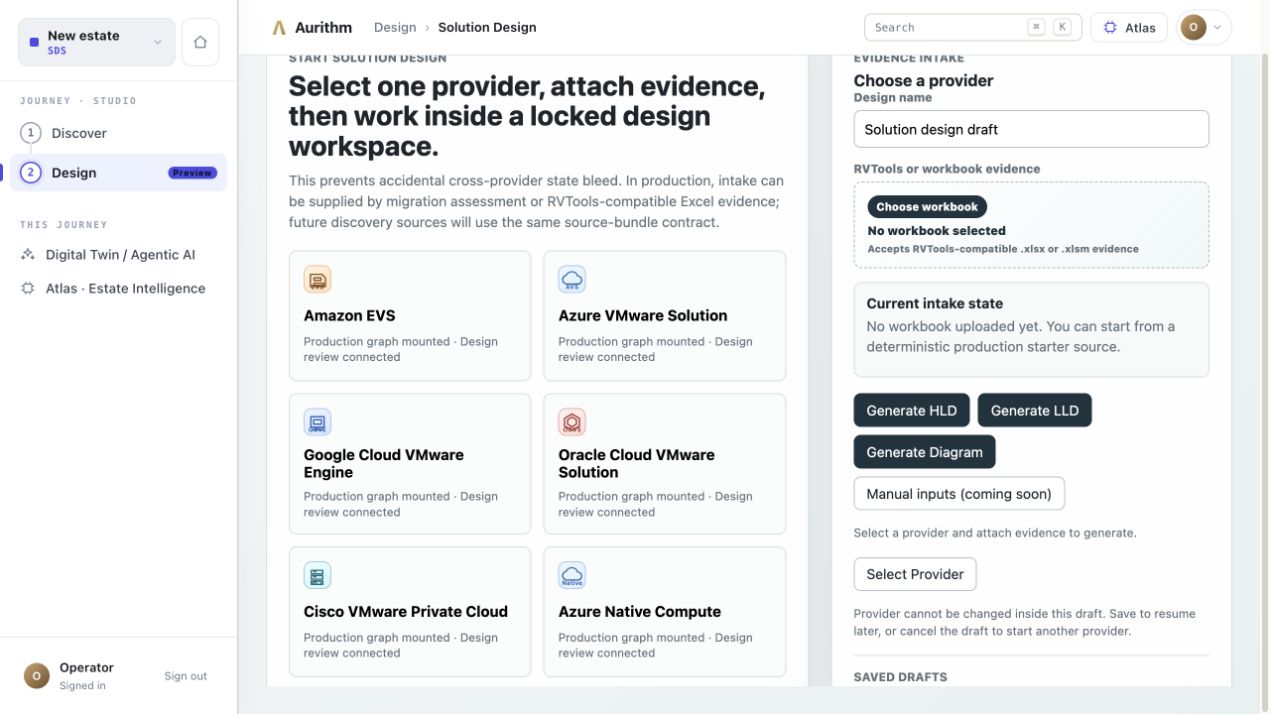
Choose one provider and prevent accidental cross-provider state bleed inside the design workspace.
 AURITHMInfrastructure decision softwareBook a working session
JOURNEY 03 · SOLUTION DESIGN
Use a locked, provider-specific workspace to validate design inputs, expose blockers, and generate supported architecture artifacts without restarting from a blank template.
PRODUCT PROOF
HOW THE DECISION MOVES
Choose one provider and prevent accidental cross-provider state bleed inside the design workspace.
Attach assessment or RVTools-compatible evidence and make required inputs, warnings, and blockers visible.
Inspect provider-specific building blocks, flows, rules, traceability, governance, and output readiness.
Generate HLD, LLD, diagrams, decks, proof packs, and review-only Terraform where target coverage allows.
INPUTS
Approved target and customer design intent
Assessment or RVTools-compatible evidence
Provider-specific constraints and governed knowledge
Reviewed requirements, assumptions, and exceptions
OUTPUTS
High-level and low-level design
Logical, deployment, and flow diagrams
Decision deck, evidence pack, and proof package
Review-only Terraform for supported designs
EXPLICIT BOUNDARY
Design coverage varies by provider and deployment. All artifacts require authorised customer and partner review. Terraform is review-only and must not be treated as apply-certified production code.
AURITHM WORKING SESSION
We will map the evidence path, the decisions Aurithm can support, the review outputs required, and the specialist validations that remain.
Plan the session